
Online and Mobile Banking
Starting Monday, August 4th Niagara’s Choice will have a brand new online and mobile banking system designed to enhance security, simplify navigation, and introduce new features to make managing your finances even easier.
New Features
- New modern design for ease of use
- You will see all the accounts that you have or are joint on
- Member to Member transfers
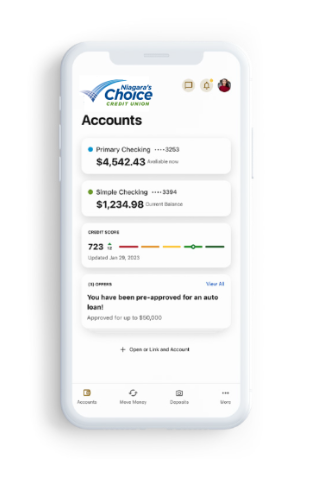
- Credit Score Availability
- Owners Choice Mortgage balances will show in your account
- Access to Debit and Credit Card information
- Custom alerts and notification tools
- Savings Goal Tracker/Financial wellness tools
- Customizable screen – show the accounts you want to, hide the ones you don’t
- You will have the ability to link external accounts
- Intuit and QuickBooks – access to be added later this year
Telephone Banking
Our new telephone banking system has been upgraded to provide you with information for any account you are on. No need to log into multiple accounts anymore. Please note – you will need to use a new login for the telephone banking system. The new login will consist of the last 4 digits of your social security number, and the four digit year of your birth. For example, if your Social Security number is 111-222-3333 and your year of birth is 1952, then your login would be 33331952. You will also need to establish a new PIN. This number should be 4 to 6 digits long and cannot be your social security number or date of birth.
Getting Started
Allowable characters for passwords are: _ ~ @ # $ % ^ & + = ` { } : ; ! . ? ( ) [ ] –
Frequently Asked Questions
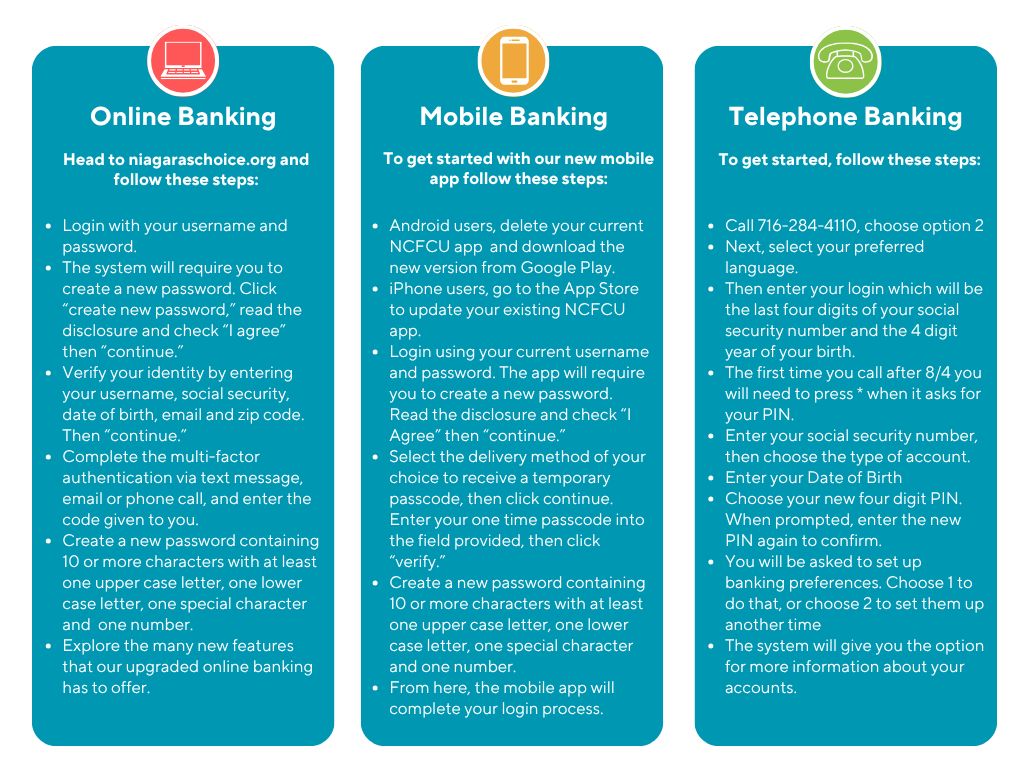
If you are already an active user of online or mobile banking, you will log in the same way you always have. You will log in with your current username and password. You will then do a password reset to a new password that meets the minimum standard requirements. All passwords must be 10 or more characters long and include at least one uppercase and one lowercase letter, at least one number and one or more special characters. Allowable characters for passwords are: _ ~ @ # $ % ^ & + = ` { } : ; ! . ? ( ) [ ] –
To use the mobile app, Android users will need to delete their current app and download the new one from Google Play. iOS users can simply update their current app through the App Store.
To login to the new online banking, you will need to use the log in box on the niagaraschoice.org homepage.
Your username and password will transfer over to the new digital banking system.
Simply click “Forgot Username or Password”
No. You will be able to see all accounts that you are on with one login.
All your account information will be in the new digital banking, but will be displayed differently.
Yes. All of your payee information will carry over. Please review your Bill Pay settings just be to sure everything is correct.
We are working to make sure that all transfers are brought into the new system. You can review your scheduled transfers by clicking “Review” under the Transfer and Pay heading. The click “Transfer” and “Scheduled.”
Utilizing a strong and unique password is important in keeping your digital banking account secure. Avoid using the same password for multiple purposes. Using multi-factor authentication further secures your account with either phone, test, or email codes that must be provided to gain access.
With our new telephone banking system, you will use a new login. The login will consist of the last 4 digits of your social security number, and the 4 digit year of your birth. For example, if your Social Security number is 111-222-3333 and your year of birth is 1952, then your login would be 33331952. Keep in mind that many of the phone banking prompts have changed. Listen carefully to the new options.
If you have issues, you can call us at 716-284-4110.
Contact Us
Call Us
Our call center is open Monday-Friday from 8:30am until 5:00pm and Saturday from 8:30am until 12:00pm. Call us at 716-284-4110
Visit Us
To find a branch near you visit our Locations/ATMS tab at the top of our website.
Email Us
Send a message to [email protected]. Please note that this email is not a secure form of communication. Do not include account numbers or any sensitive account information.